Workout For Me Try Demo

On-Device Camera Rep Tracking · iPhone

PROP UP YOUR IPHONE.
OWN EVERY SET.

Hands-free on-device camera rep counting across 66 exercises, built-in structured programming and PR stats, a bring-your-own-key + MCP AI Coach, and private end-to-end encrypted Friends.

  • Camera video stays on your device
  • No account required to train
  • Free & Pro · Adults 18+
An athletic man in a charcoal sweatshirt and gray sweatpants holding the bottom of a bodyweight squat in a training studio with an illustrated pose skeleton overlay. On-Device Pose · Sample Frame
Camera Tracking (Beta) Bodyweight Squat
03 Reps

Pillar 01 · Hands-Free Camera Tracking

BUILT FOR REAL SETS.
66 CAMERA EXERCISES.

Keep your hands on the bar, bells, or floor. On-device pose tracking follows your movement through the whole gym workflow—with instant tap controls whenever you want them.

  1. 01

    Prop & Auto-Frame

    Live placement guidance tells you when your full movement range is in view before you touch a weight.

  2. 02

    Hands-Free Start

    Raise a hand from your setup position or use the built-in countdown—no walking back to tap Start.

  3. 03

    Voice Reps & Cardio Time

    Hear spoken rep counts or active cardio and hold timing while large on-screen digits stay readable across the room.

  4. 04

    Instant −1/+1 & Rest Timer

    Adjust any rep in one tap, switch to manual tap logging anytime, and roll straight into your Lock Screen Live Activity rest timer.

Complete 66-Exercise Camera Directory

Every built-in strength, bodyweight, machine, cable, core, and cardio movement with beta camera tracking.

All 66 Built-In · Camera Beta
  • Back SquatBarbell
  • Front SquatBarbell
  • Bodyweight SquatBodyweight
  • Goblet SquatDumbbell
  • Hack SquatMachine
  • Smith Machine SquatMachine
  • Leg PressMachine
  • Romanian DeadliftBarbell
  • Dumbbell RDLDumbbell
  • Sumo DeadliftBarbell
  • Good MorningBarbell
  • LungeBodyweight
  • Reverse LungeBodyweight
  • Dumbbell LungeDumbbell
  • Leg ExtensionMachine
  • Leg CurlMachine
  • Standing Calf RaiseMachine
  • Seated Calf RaiseMachine
  • Hip ThrustBarbell
  • Glute BridgeBodyweight
  • Bench PressBarbell
  • Incline Bench PressBarbell
  • Decline Bench PressBarbell
  • Dumbbell Bench PressDumbbell
  • Incline Dumbbell PressDumbbell
  • Dumbbell Chest FlyDumbbell
  • Chest PressMachine
  • Pec Deck FlyMachine
  • Cable CrossoverCable
  • Push-UpBodyweight
  • Knee Push-UpBodyweight
  • DipBodyweight
  • DeadliftBarbell
  • Barbell RowBarbell
  • Pendlay RowBarbell
  • Dumbbell RowDumbbell
  • Dumbbell ShrugDumbbell
  • Lat PulldownCable
  • Seated Cable RowCable
  • Pull-UpBodyweight
  • Chin-UpBodyweight
  • Assisted Pull-UpMachine
  • Overhead PressBarbell
  • Push PressBarbell
  • Dumbbell Shoulder PressDumbbell
  • Lateral RaiseDumbbell
  • Front RaiseDumbbell
  • Rear Delt FlyDumbbell
  • Face PullCable
  • Barbell CurlBarbell
  • Dumbbell CurlDumbbell
  • Hammer CurlDumbbell
  • Dumbbell Tricep ExtensionDumbbell
  • Tricep PushdownCable
  • PlankTimed Hold
  • Ab Crunch MachineMachine
  • Sit-UpBodyweight
  • Hanging Leg RaiseBodyweight
  • Mountain ClimberBodyweight
  • TreadmillCardio
  • Stationary BikeCardio
  • Rowing MachineCardio
  • EllipticalCardio
  • Stair ClimberCardio
  • Jump RopeCardio
  • Jumping JackBodyweight

Camera tracking is marked beta across all 66 exercises—counts depend on framing, lighting, and visibility. Add unlimited custom exercises or log any set by tap whenever you prefer.

Pillar 02 · Real iPhone Experience

A COMPLETE LOG.
ZERO CLUTTER.

Built in native SwiftUI for fast gym-floor use—with dark contrast, clear targets, instant set edits, and local data portability from day one.
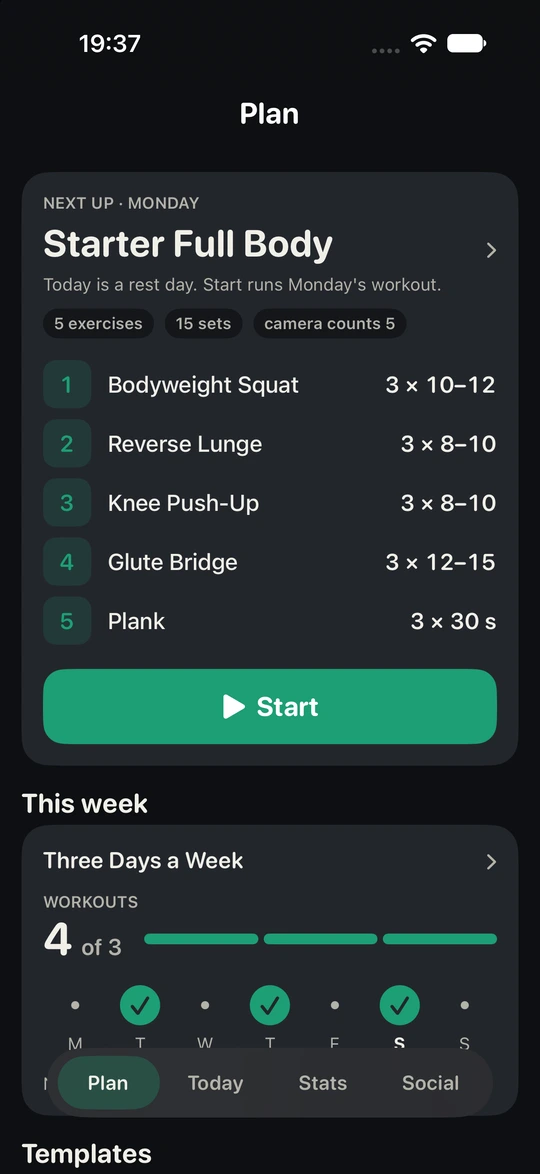
Plan screen showing Starter Full Body routine, 5 exercises, camera-counted badge, weekly schedule, and Start button
Plan & Programs Routines, multi-day programs, supersets, target reps & loads, and camera-ready tags.
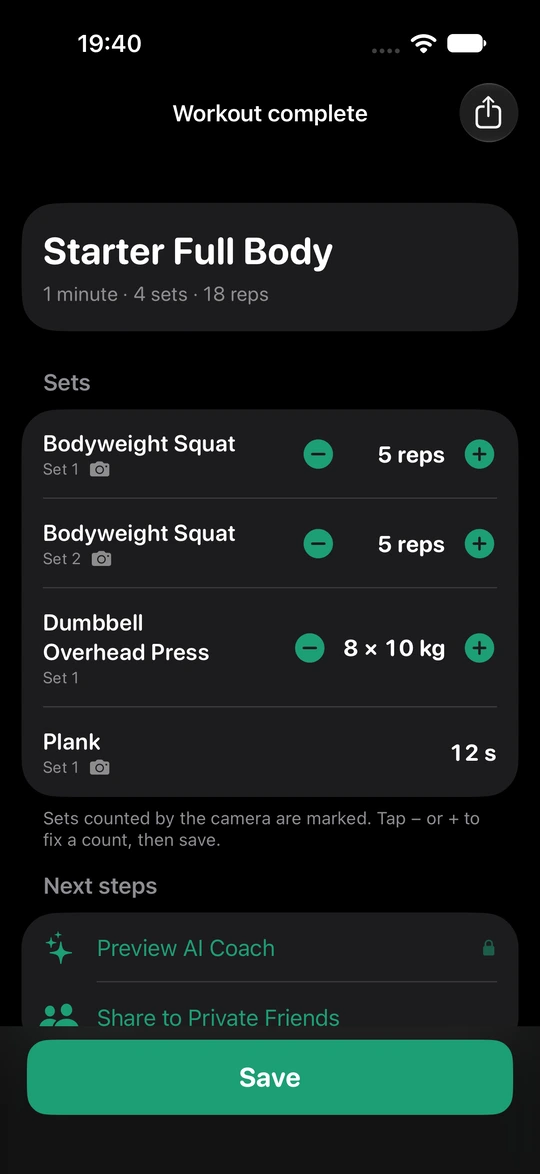
Workout complete review screen with camera-counted sets, instant minus and plus buttons, and one-tap Save
Today & Set Review Camera-counted sets clearly badged, 1-tap −1/+1 adjustments, and instant save to Apple Health.
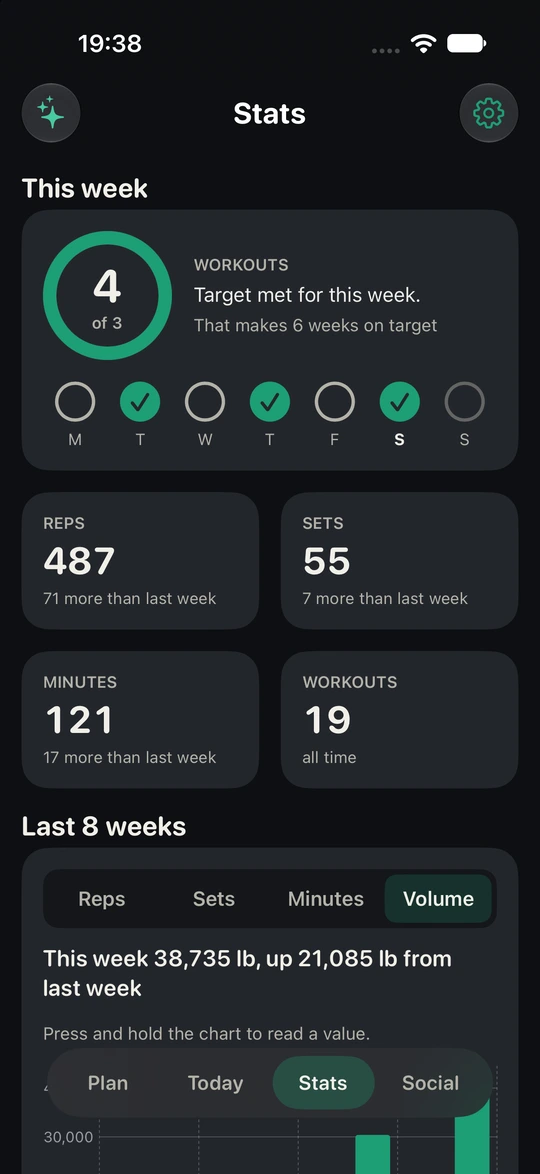
Stats screen showing weekly target ring, reps, sets, minutes, all-time workouts, and 8-week volume trend chart
Stats, PRs & History Weekly consistency rings, standing PRs, 8-week volume trends, CSV import & JSON backup.
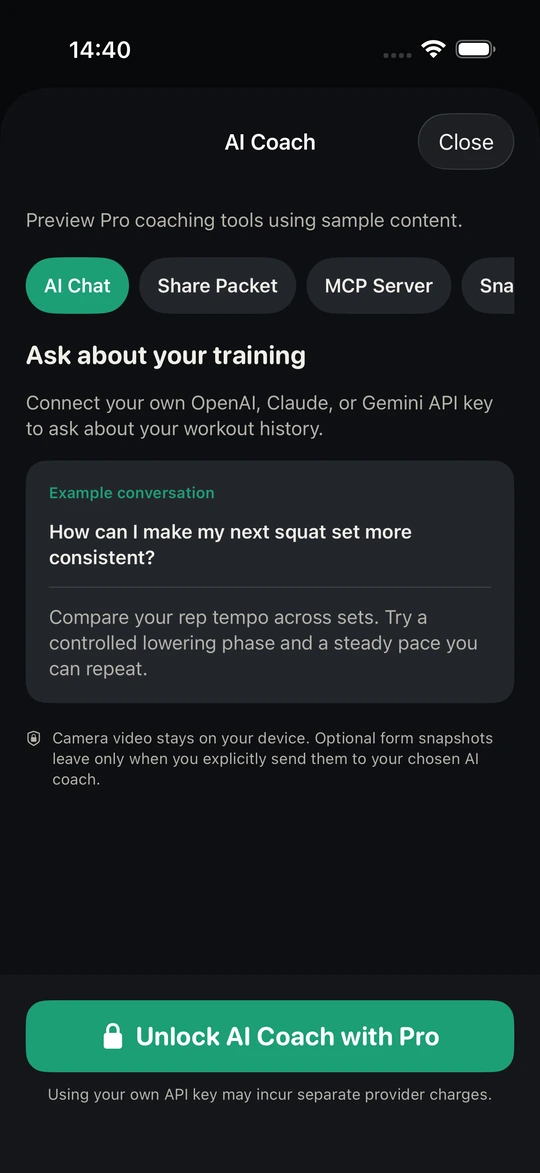
AI Coach screen showing AI Chat, Share Packet, MCP Server, and Snapshots preview tabs with on-device privacy disclosure
AI Coach Preview Explore AI Chat, Share Packet, MCP Server, and opt-in snapshots free before upgrading.
  • Supersets & Target Loads
  • Strong & Hevy CSV Import
  • CSV Export & JSON Backup
  • Apple Health Workout Write
  • Lock Screen Live Activity Rest Timer
  • Works Offline Without an Account

Real iPhone screenshots showing seeded demonstration training data.

Pillar 03 · Interactive Zero-JS Preview

TAKE A SET
FOR A SPIN.

Run a 12-second illustrated squat set right in your browser—no JavaScript, no downloads, and your camera stays completely off. Watch each rep count as the athlete stands, inspect rep-by-rep tempo and depth, then explore all three AI Coach modes.

  • Tempo & ROM Fatigue — Compare Rep 1 vs Final Rep eccentric control and depth.
  • Multi-Week Progression — Inspect sample 4-week e1RM trend and concrete next-session targets.
  • Peak-Phase Snapshots — Preview face-blurred Setup, Bottom Turnaround, and Final Rep cards.

Simulated workout preview. Your camera never activates on this site.

Pillar 04 · Open BYOK + MCP AI Coach

YOUR DATA. YOUR AI.
ZERO LOCK-IN.

Most fitness apps bury your log behind a generic chatbot with a monthly token markup. Workout For Me lets you plug in your own frontier model—or connect your desktop AI directly over local Wi-Fi.

Mode 01 · In-App Chat

Bring Your Own API Key

Connect OpenAI (ChatGPT), Anthropic (Claude), or Google Gemini directly from iOS Keychain. Zero middleman markup, with explicit per-provider consent before anything is sent.

Mode 03 · Portable Context

Reviewed Share Packet

Review and export a structured training summary—session history, progression trends, and numeric pose telemetry—to paste or share into any AI app you already use.

Sample Coaching Context Simulated Set

“Compare my rep tempo, 4-week progression, and peak-phase form.”

Rep Tempo & Relative Depth Down / Up
4-Week e1RM Trend 196 → 214 lb Top of 3 × 8–10 target reached
Next-Session Target 180 lb × 8 +15 s rest to hold Rep 3 depth
Opt-In Peak-Phase Snapshots Off by Default · Face Blur ON
Structured MCP Tools MCP 2025-03-26

Every tool enforces per-provider consent on your iPhone. Stop the local server or reset AI Coach privacy in one confirmation anytime.

  • get_training_overview Multi-week adherence, streaks, volume trends, muscle balance, and stalled-lift alerts.
  • get_active_workout Live in-progress session context, intra-session fatigue trend, and prior-session baseline.
  • list_workouts & get_workout_detail Paginated workout history plus per-exercise targets, every logged set, and snapshot links.
  • get_exercise_progression & get_personal_records Load, rep, tempo, ROM, consistency, plateau status, camera-angle drift, and standing PRs.
  • get_set_pose_telemetry Per-rep eccentric/concentric tempo, relative depth, consistency, symmetry, and rejection breakdown.
  • get_training_plan Active program, weekly schedule, routines, target loads, set kinds, and rest timers.
  • get_form_keyframes Opt-in face-blurred peak-phase keyframes (up to 5 compact JPEGs/set)—only when separately authorized.

Browse interactive AI Coach examples free. Live BYOK Chat, Share Packet, Local Wi-Fi MCP Server, and opt-in form snapshots unlock with Pro. Using your own API key may incur separate AI provider charges. Form snapshots are off by default, face blur is on by default, and snapshots leave your device only when you explicitly send them to your chosen AI coach.

Pillar 05 · Private Decentralized Friends

TRAIN WITH FRIENDS.
NOT AN ALGORITHM.

Share finished workouts strictly with people you actually know—without building a public follower graph, handing your social circle to an ad network, or broadcasting your gym schedule to strangers.

  • Mutual-Acceptance Pairing Connect in person via QR scan, single-use invite link, or nearby gym pairing (MultipeerConnectivity).
  • End-to-End Encrypted Circles On-device secp256k1 keys in iOS Keychain, NIP-44 / NIP-59 Gift-Wrap over your chosen Nostr relays, and O(1) symmetric circle keys that rotate immediately on remove or block.
  • Built-In Safety & Control Local content screening, instant Hide, Remove, Block, and reviewed Report controls, passphrase-encrypted identity backup, and 1-tap Account Deletion.

Privacy Architecture

CAMERA VIDEO STAYS
ON YOUR DEVICE.

A clear line between what never leaves your iPhone and what travels only when you explicitly trigger it.

Always On Your iPhone

Local by Architecture

  • Live camera & pose tracking: Frames are processed locally on-device. Raw camera video is never recorded and never written to your Photos library.
  • Your training database: Workouts, plans, PRs, custom exercises, and settings live locally—no account required.
  • Keys in iOS Keychain: Your optional AI provider API keys and private Friends cryptographic keys stay protected on-device.
  • Opt-in form snapshots: Off by default, face blur on by default, protected with iOS Complete File Protection, excluded from iCloud Backup and JSON backups, with 7/30/90-day auto-pruning.
  • Zero intrusive permissions: No Photos, Contacts, Location, Microphone, Calendar, Bluetooth tracking, IDFA, or App Tracking Transparency.
Explicit User Action Only

Under Your Control

  • AI Coach (Pro, opt-in): Sends only the context scope you approve to OpenAI, Anthropic, Google Gemini, Share Packet, or your active Local Wi-Fi MCP client. Form snapshots leave only when you explicitly send them.
  • Private Friends (opt-in): Sends end-to-end encrypted workout posts to your mutually accepted circle via your chosen Nostr relays or nearby Wi-Fi.
  • Exports & Apple Health (opt-in): CSV/JSON backups go only where you choose in the iOS share sheet; Apple Health writes completed workouts only if enabled.
  • Free-tier contextual ads: Non-personalized AdMob ads (npa = 1, UMP where required) during rest and after workouts—never during active lifting, and removed on Pro.

Transparent Pricing

START FREE.
UPGRADE IF YOU WANT MORE.

All 66 beta camera exercises, structured plans, PR stats, CSV/JSON portability, and Private Friends are included free—no account wall. Pro removes ads and unlocks custom rest timers plus live AI Coach tools.

Core Training

Free

$0

No account required

  • All 66 camera-tracked exercises (beta) + 1-tap manual logging & custom lifts
  • Full Plan, programs, supersets, target loads & weekly schedules
  • Stats, standing PRs, 8-week volume trends, Strong/Hevy CSV import & JSON backup
  • Private Decentralized Friends (QR, invite link & nearby gym pairing)
  • Interactive AI Coach examples to preview before upgrading
  • Default rest timer & optional Apple Health workout write

Contextual, non-personalized ads may appear during rest and after completed workouts—never during active lifting.

Ad-Free + Live AI Coach

Pro

$4.99 / month

or $119.99 one-time Lifetime

  • Everything in Free, completely ad-free
  • Custom rest timers from 15 s to 10 min
  • Live AI Coach BYOK Chat (OpenAI, Anthropic Claude, Google Gemini)
  • Local Wi-Fi MCP Server (2025-03-26) for desktop & MCP AI assistants
  • Reviewed Share Packet export for any AI app
  • Opt-in face-blurred peak-phase form snapshots (up to 5 compact JPEGs/set, off by default)

Planned US prices via native Apple StoreKit 2. Monthly renews automatically until canceled in Apple Account settings; Lifetime is a one-time non-consumable purchase. Separate AI provider charges may apply when using your own API key.

iPhone Release

COMING TO IPHONE.

Releasing on iPhone in 140+ countries worldwide (including the US, Canada, UK, Australia, New Zealand, Japan, and Singapore). Built for adults 18 and older. Camera video stays on your device.